
The Cipher SPEAR MCP Server lets MCP-compatible AI assistants work with Cipher SPEAR, the SAP AppCenter-registered strategy execution platform that succeeded SAP Strategy Management. Assistants read scorecards, KPIs and initiatives, and they propose changes for you to approve.
Last updated: November 2026.
Deployment status: The SPEAR MCP Server is ready to deploy for SPEAR customers who want to add it. Cipher tested it in its development tenant, and it now runs on SAP BTP in Cipher's production tenant. To see it working on demo data, book a SPEAR session.
What is the SPEAR MCP Server?
The SPEAR MCP Server is a connector that gives an AI assistant a defined set of SPEAR tools. Some tools read plans, scorecards, KPIs, initiatives and measures. Others propose changes, and SPEAR previews each one as a dry run before it writes anything. You ask in plain language, and the assistant then answers from your live SPEAR data.
What is MCP?
MCP stands for Model Context Protocol. It is an open-source standard for connecting AI applications to external systems, such as data sources, tools and workflows.
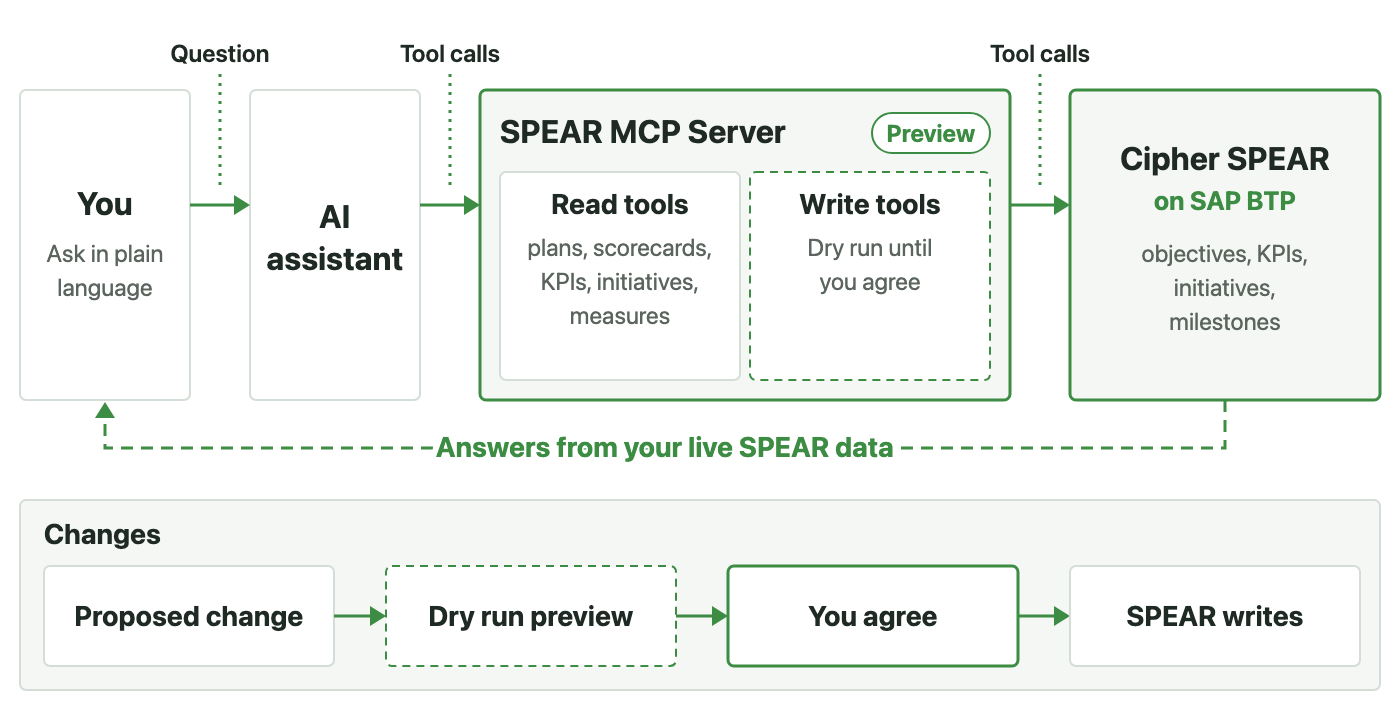
SPEAR stands for Strategy, Planning, Execution and Reporting. The Cipher SPEAR strategy execution platform runs on SAP Business Technology Platform. It holds the strategy structure your team already uses, whether that is a Balanced Scorecard, OKRs, or your own framework. Objectives and KPIs are scored in five color statuses, and initiatives carry budgets and milestones. However, the MCP Server does not replace any of that. Instead, it gives you a new way to ask questions of it and to prepare updates to it.
Cipher Business Solutions is an EPM consulting and software firm in Doral, Florida, founded in 2002. You can view the SAP Store listing for Cipher SPEAR.
What does an MCP server actually do?
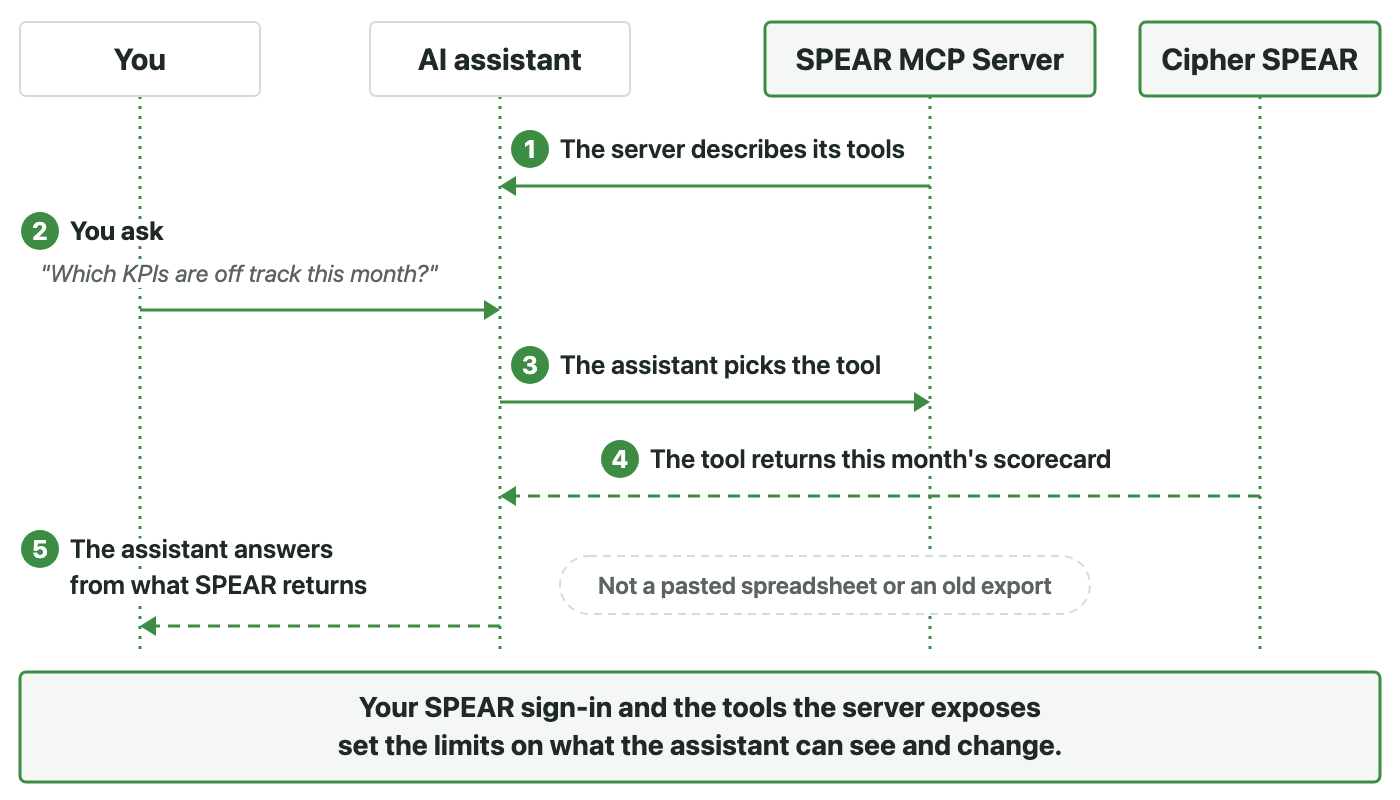
An MCP server lets an AI assistant discover and use the tools of another system. The server describes each tool it offers, and the assistant then decides which tool to call to answer your question.
In practice, the assistant does not guess from a pasted spreadsheet or an old export. For example, when you ask which KPIs are off track this month, it calls the SPEAR tool that returns this month's scorecard. It then answers from what SPEAR returns. The tools the server exposes, together with your SPEAR sign-in, set the limits on what the assistant can see and change.
What can an AI assistant do in SPEAR through MCP?
Every write tool runs as a dry run by default, and nothing changes until you agree.
Two notes on the counts. One of the read tools simply builds a link to an initiative for use inside a comment. The 3 session tools cover sign-in, who you are in SPEAR, and which SPEAR environment you work in.
The table below groups the tools into five areas. For each area, it shows what an assistant can read beside what it can propose as a change.
Which tools does the SPEAR MCP Server expose in each area?
| Area | Read | Write (dry run until you agree) |
|---|---|---|
| Plans and scorecards | Plans with their path, model and roles. A plan's scorecard for a period, with each KPI's actual, target, score, and color status. Filtered scorecard reports, for example every red or yellow KPI. | Create a plan version by copying an existing one. Copy a scorecard from another plan. Align objectives to the parent plan. Set how scores roll up from KPI to objective, perspective, and plan. |
| KPIs | A KPI's definition, thresholds, current value, history over past periods, comments, and linked initiatives. Changes on the scorecard pending approval. | Set custom fields, descriptions, and the measure a KPI uses. Set the five color thresholds, which wait for approval in SPEAR on plans that require it. Set responsible users. Post or edit periodic comments. |
| Initiatives and milestones | Initiatives with schedule status, completion, budget against actual, owner and linked KPIs. One initiative in full, with its milestone tree, comments, and the initiatives aligned to it. | Create an initiative. Change its fields. Create or update milestones and sub-milestones. Post comments, with links to the initiative's page in SPEAR. |
| Measures and data | Measures with periodicity, uploader, and approvers. Data waiting for approval, shown beside the values it would replace. | Create a measure. Upload actuals and targets with a PDF evidence note. Carry out the measure approver's own decision to approve or reject pending data. Set uploaders and approvers. |
| Models and access | Data models. Roles and the users who hold them. Custom field settings. The signed-in user, their roles, the environment and the plans the server may write to. | Create a data model. Create a role, or change its name, admin rights and members. Give a role access to plans. |
Which AI assistants work with the SPEAR MCP Server?
The SPEAR MCP Server speaks MCP, the open protocol that AI assistants use to connect to software. Cipher has tested it with Claude, Grok (used from Cursor and VS Code), ChatGPT, and Microsoft 365 Copilot.
What if your organization uses a different LLM or AI subscription?
Most organizations have already chosen an AI provider, and you can keep yours. The SPEAR MCP Server connects through MCP, so it works with the LLM and the subscription you already pay for. Your assistant needs two things:
- Remote MCP connections: your assistant must support them, and your plan must include custom connectors. Some AI providers reserve those for certain plans.
- SAP sign-in: each user signs in through the browser with their own SPEAR account, regardless of which assistant they use.
We set which assistants may sign in for each customer deployment. Tell us which one you use when you book a session, and we will confirm it with you before you roll it out.
Is it safe to let an AI assistant update strategy data?
The SPEAR MCP Server keeps an assistant inside SPEAR's existing controls rather than around them. Nothing changes until you agree to a dry run. The assistant also works with your own SPEAR sign-in, and approvals stay in SPEAR.
- SAP sign-in: you sign in through SAP XSUAA in the browser, so the assistant acts with your own sign-in.
- Set write scope: each deployment sets the plans and models the server may change. Each dry run also reports whether the plan falls inside that scope.
- Dry run by default: every write tool that changes data shows the proposed change, then applies it once you agree.
- Approvals stay in SPEAR: on plans that hold changes for approval, new thresholds wait as pending changes. Uploads to measures with approvers also wait for approval in SPEAR. Pending data needs a decision from the measure's approver. The assistant can carry out that decision after a dry run, but it does not decide on its own.
- Visible authorship: a comment posted through the assistant always carries the signed-in user and the date. Editing a comment also keeps its original author and date.
- Controlled batches: you can cap bulk writes and test a change on one item before the rest.
- Separate environments: on SAP BTP, each SPEAR environment has its own server deployment. So the assistant works in one environment at a time.
How does the SPEAR MCP Server know who you are and what you can access?
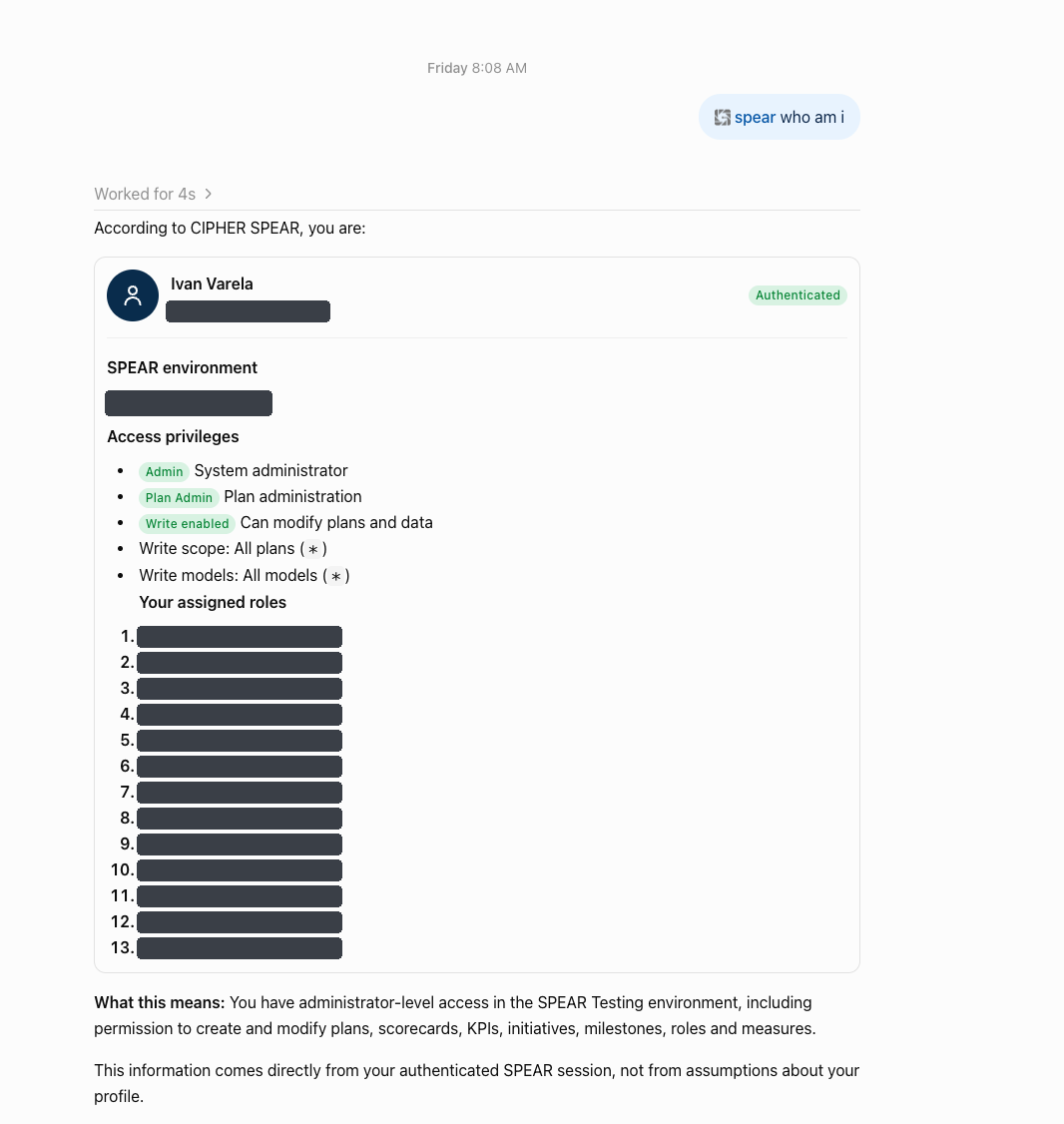
Every request to the SPEAR MCP Server carries your own SAP sign-in token. The server verifies that token with SAP XSUAA and then passes it to SPEAR. So the assistant works as you, with no shared account. SPEAR's APIs then apply your access to everything the assistant reads. As a result, the assistant returns the data your SPEAR roles allow, and the rest stays out of reach.
You can check this yourself. Ask "Who am I in SPEAR?", and the assistant returns your name, your roles and the environment you are connected to. Next, ask which plans you can access. The list reflects your own roles, so two people asking the same question can get different answers. Our test account is an administrator in Cipher's production tenant, and that deployment lets the server write to all plans and models.
Does your security or audit team have questions beyond these controls? Bring them to a session, and we will walk through them with you.
What questions can you ask SPEAR through an AI assistant?
You can ask the questions a strategy office normally answers by hand before a review. What is off track? Which work is slipping? Which KPIs are at risk, and what should we do about them? What should the board commentary say?
The examples below ran on demo data: a fictional energy utility's corporate scorecard and its operations division plan. Unless stated otherwise, they cover a single month, September. Owners appear as roles in the text.
How did ChatGPT use the SPEAR MCP Server to assess the quarter and draft a SAIDI initiative?
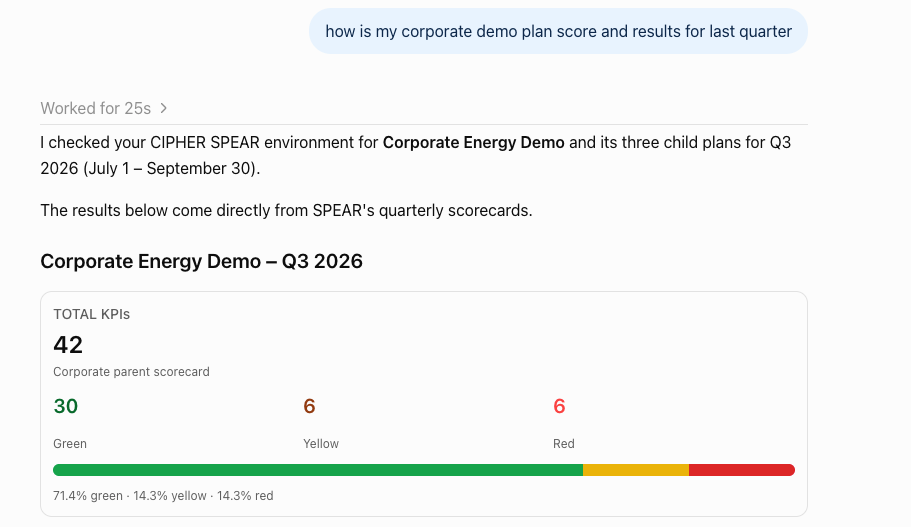
We asked ChatGPT this question on the demo corporate plan and asked about the third quarter as a whole. SAIDI is the outage minutes-per-customer KPI. It reads 83.46 here, the average of its July, August and September values.
ChatGPT returned 42 KPIs on the corporate scorecard: 30 green, 6 yellow and 6 red. In percentage terms, that is 71.4% green, 14.3% yellow and 14.3% red.
Next, we asked it to draft a risk-mitigation initiative for SAIDI before creating anything. ChatGPT tied the draft to the Operational Excellence perspective and to the objective of improving reliability in all our operations. It set out the gap: 83.46 minutes per customer against a target of 43.8, about 90.5% above target, where lower is better. It also labeled the result a draft, not yet created, under the working title Improve Grid Reliability and Reduce Customer Interruption Duration.
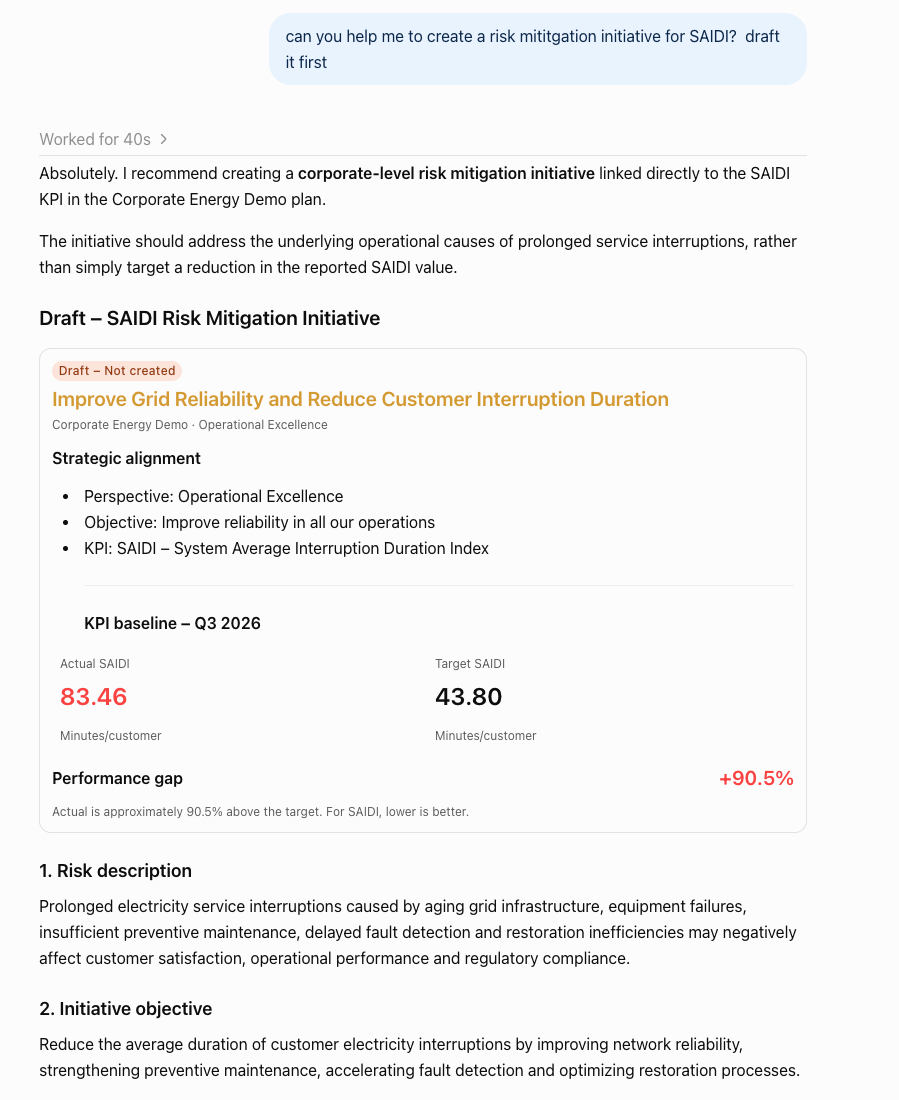
The draft then built on what SPEAR already held. It used the ratings on the grid reliability risk, and it recommended coordinating the three existing initiatives, at 66%, 73% and 78% complete, rather than duplicating them. Finally, it asked for approval before creating anything in SPEAR.
What happened when we told ChatGPT to create the initiative in SPEAR?
We then asked for milestones at several levels, and ChatGPT proposed 6 main milestones, 18 second-level milestones and 54 third-level tasks. Once we told it to create the initiative, it wrote them to the demo plan and reported 78 milestone records in total.
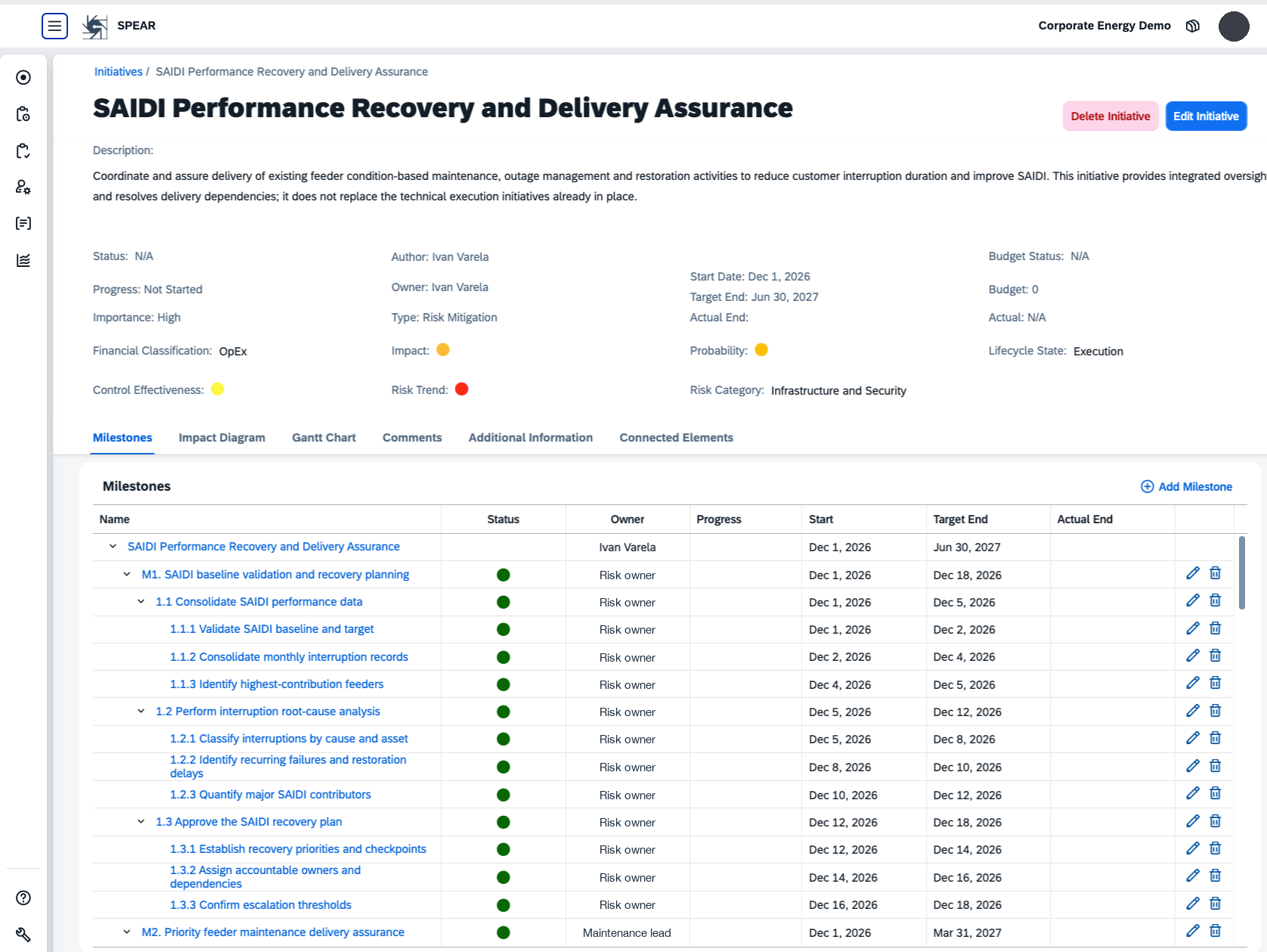
The initiative page in SPEAR shows the result. SAIDI Performance Recovery and Delivery Assurance is a risk-mitigation initiative at high importance, not started, running from 1 December to 30 June. It also carries the financial classification OpEx, the lifecycle state Execution, the risk category Infrastructure and Security, and ratings for impact, probability, control effectiveness and risk trend. Below that sits the milestone tree, with an owner and dates on every line. In other words, one conversation took the quarter's results to a planned recovery, and a person decided when SPEAR changed.
"Draft this month's board comment on the division's recordable injury rate."
The assistant read the KPI and its history against a target of 0.98 cases per 200,000 hours. The values ran April 1.14, May 1.18, June 1.18, July 1.22, August 1.24 and September 1.25, light red from May onward. It also read the linked field-crew fatigue and overtime control initiative, as well as the existing comment for the period.
Next, it drafted a 343-character comment and sent it as a dry run. The subject read "Board summary: recordable rate above target for six months". The dry run confirmed that the plan was within the write scope, and it returned no warnings. However, the dry run posted nothing, and a re-read showed the KPI still carried exactly one comment. Posting would still need the user's go-ahead. The posted comment would then carry the signed-in user and the date. For how this commentary feeds board packs, see board reporting with live scorecards.
"Which KPIs on our corporate scorecard are red or yellow this month, and are any getting worse?"
On the demo corporate scorecard, the assistant returned a plan score of 98.95, light green, across 42 KPIs. Of those, 20 were dark green, 10 light green, 6 yellow, 1 light red and 5 dark red. A filtered report then returned the 12 KPIs in red or yellow. Each also came with its objective, its responsible user and a link to its page in SPEAR. Two perspectives sat below target: External Relationships at 70.0, dark red, and Financial Integrity at 80.0, light red.
For trend, the assistant pulled six months of SAIDI history against a target of 43.8. SAIDI is the outage minutes-per-customer KPI. The values ran April 76.4, May 80.9, June 86.7, July 88.2, August 84.1 and September 78.07. So SAIDI stayed dark red all six months, peaked in July, and has improved since. In short, one question replaces the manual collation before a monthly strategy review.
"Which strategic initiatives are behind schedule, and which milestones are overdue?"
When we asked this from ChatGPT, SPEAR flagged 24 of the demo corporate plan's 31 initiatives as red, behind schedule. Five of those are older demo records with target dates in past years, which leaves 19 current initiatives. The report listed each one's owner, completion and target date.
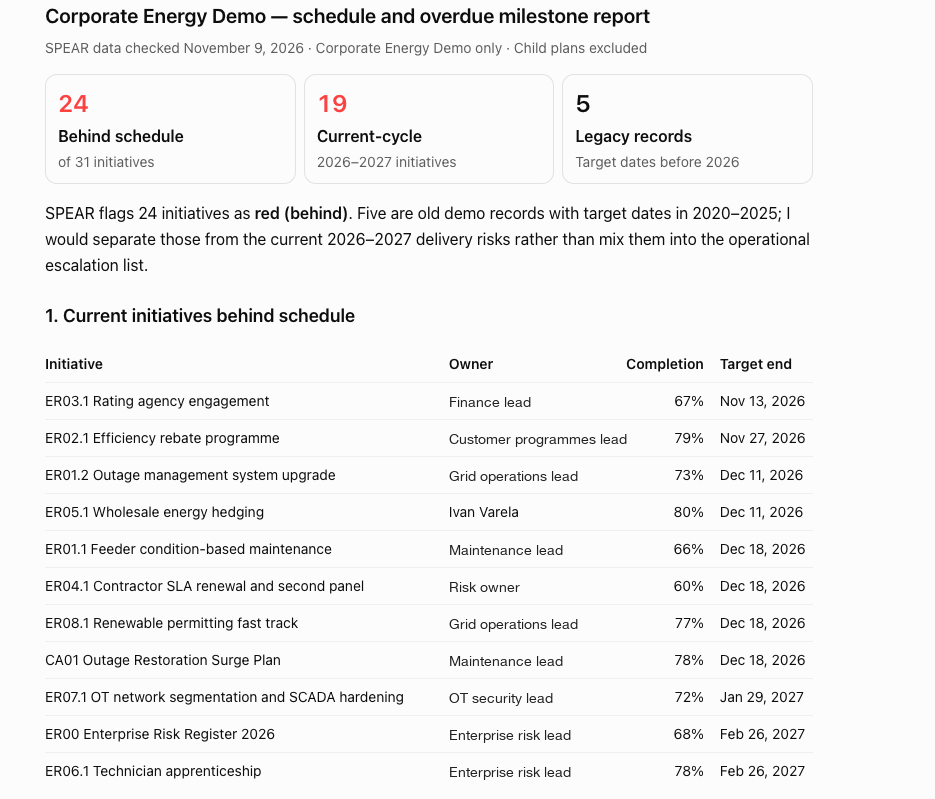
In an earlier run, three risk-mitigation initiatives showed as delayed, at 67%, 66% and 60% complete. Together they carried a budget of 2,850,000 against actual spend of 1,330,000.
Next, the assistant pulled details on the feeder condition-based maintenance program, which the maintenance lead owns. It returned a budget of 2,400,000, actual spend of 1,150,000, 66% complete and behind schedule. Its overdue milestone, mobilizing contractor crews on priority feeders, fell due on 31 August and stood at 55%. Below it, a sub-milestone for certified linesmen from the contractor, due 15 August, stood at 20%. The assistant also traced the aligned initiative on the division plan, priority feeder crew deployment, at yellow and 55% complete.
How does the connection to the SPEAR MCP Server work?
The SPEAR MCP Server runs on SAP BTP. The AI assistant connects to it from Cursor, VS Code, ChatGPT or Microsoft 365 Copilot, and you then sign in with your own SPEAR account. The connection takes six steps, and you approve every change before SPEAR writes it.
- In Cursor, VS Code, ChatGPT, or Microsoft 365 Copilot, connect the AI assistant to the SPEAR MCP Server.
- Sign in to SPEAR with SAP when the browser sign-in tab opens.
- Ask the assistant who you are in SPEAR, to check your name, your roles and the environment.
- Ask a read question, such as which KPIs are red or yellow this month.
- Review the dry run of any change the assistant proposes.
- Approve the change, and the assistant applies it with your SPEAR sign-in.
If SPEAR later reports that you are not signed in, reconnect the SPEAR connector to sign in again. This article gives no connection settings, because each customer deployment has its own.
Is the SPEAR MCP Server ready to deploy?
The SPEAR MCP Server is ready to deploy for SPEAR customers who want to add it. The current status:
- Development: We tested it in our development tenant.
- Production: it runs on SAP BTP in our production tenant.
- AI assistants tested so far: Claude and Grok, used from Cursor and VS Code, and ChatGPT and Microsoft 365 Copilot.
If you run SPEAR, or you are evaluating it, we can show you the server working on demo data and talk through how it would fit your scorecard. To plan a deployment, browse our SPEAR and EPM demos, or book a session directly.
What does the SPEAR MCP Server mean for SAP Strategy Management customers?
SAP Strategy Management customers moving to SPEAR could use the MCP Server to ask questions of the same kind of scorecard they already run. That means perspectives, objectives, KPIs and initiatives. Since Cipher built SPEAR as the successor to SAP Strategy Management, the structure carries across, and the assistant becomes a new way into it.
For an SSM team, the practical gain is the review cycle. Off-track KPIs, slipping initiatives and draft commentary come from asking, while approvals stay in SPEAR. If you are still planning the move, start with our guide to the SAP Strategy Management successor. Then read how AI agents are arriving across SAP in SAP Joule and agentic AI.